
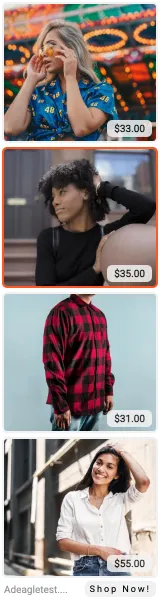



160×600 at a glance
- Size
- 160 × 600 pixels, portrait
- Names
- Wide skyscraper, skyscraper
- Google Ads name
- Wide skyscraper
- Screens
- Desktop
- File size
- up to 150 KB (JPG, PNG, GIF)
- In an Adeagle ad
- 4 products in a grid, or one product with its name
- Share of impressions
- 0.4% in our network
- Click rate
- 1.41% - 3.8× the average banner (small sample: it swings month to month)
How the 160×600 performs in our network
What we see on Adeagle
160×600 against the average banner
When to use the 160×600
✓ Good forTall tiles suit portrait product photos - apparel, bottles, furniture.
! Watch outFewer sites keep a side column than ten years ago, so this size has less space to show in.
Design tips for 160×600 ads
- Four products stacked: portrait photos fill the 152×137 tiles without empty edges.
- Put the most clicked product first - it sits at eye level when the page opens.
- Keep the file under 150 KB and export it at exactly 160×600; design at 320×1200 so it stays sharp on phones.
- Show a price - it answers the first question before the click.
Sizes to run with the 160×600
One size never covers every slot. These fit the same screens:
300×2500.46% click rate · desktop and phone728×900.33% click rate · desktop468×600.45% click rate · desktop200×2000.80% click rate · desktop and phone
Or see all 15 standard ad sizes on one page. Adeagle makes every one of them from your product photos, names and prices - no design work, and a new product appears in every size the day you add it.
Sources: Adeagle network data (September 1 to October 31, 2026); Google Ads image ad specifications. The example ads use the products of Adeagle's demo store.