
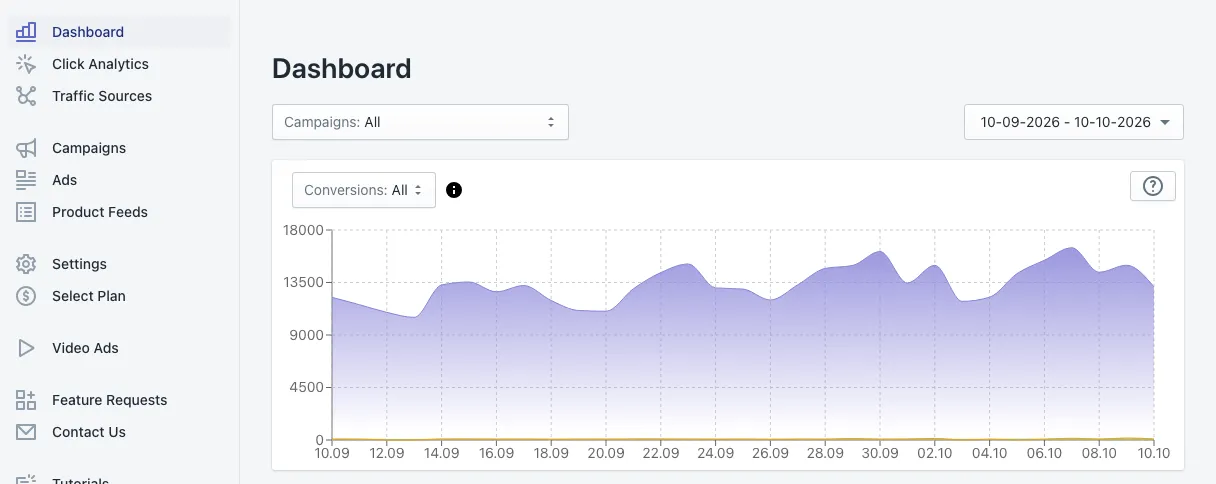
The Dashboard is the first screen you see when you open Adeagle. It answers one question: what are my ads doing for my store? It shows every number for all your campaigns together, or for one campaign at a time.
Choose what you look at
Three controls at the top decide what every number on the page means:
- Campaigns (top left) — All shows your whole account. Pick one campaign to see only its results.
- Date range (top right) — the default is the last 30 days. Pick any range; every card, the chart and the table follow it.
- Conversions (above the chart) — the attribution model, the rule that decides which orders count as sales from your ads. All is the default and counts every order your ads took part in. You can also pick Post Click, Last Click or Post View. Post-view conversions explains the four views, and you can set your default in Settings.
The chart
The chart shows your results day by day: impressions (the large purple area), clicks and revenue. Point at any day to see its exact numbers. Use it to spot trends — a campaign you started, a sale you ran, a budget change — rather than single days.
The summary cards
Under the chart, the cards sit side by side in a grid, so you can compare all your numbers at a glance. They follow the order of the daily table below. Each card shows one total for the selected period:
| Card | What it means |
|---|---|
| Impressions | How many times your ads were shown. |
| Clicks | How many times shoppers clicked an ad and came to your store. |
| CTR | Click-through rate: clicks divided by impressions. Compare yours with typical CTRs in the CTR calculator. |
| Orders | Orders your ads brought, under the selected conversions model. |
| CR | Conversion rate: orders divided by clicks. |
| Revenue | The value of those orders. If your store does not sell in US dollars, the amount in your currency comes first and the dollar value follows in brackets. |
| Ad Spend | How much of your monthly ad budget was spent in the period. |
| ROAS | Return on ad spend: revenue divided by ad spend. A ROAS of 6 means $6 of sales for every $1 of ads. The ROAS calculator shows the ROAS your margin needs. |
| Campaigns | How many campaigns are running now. New Campaign opens the campaign wizard. |
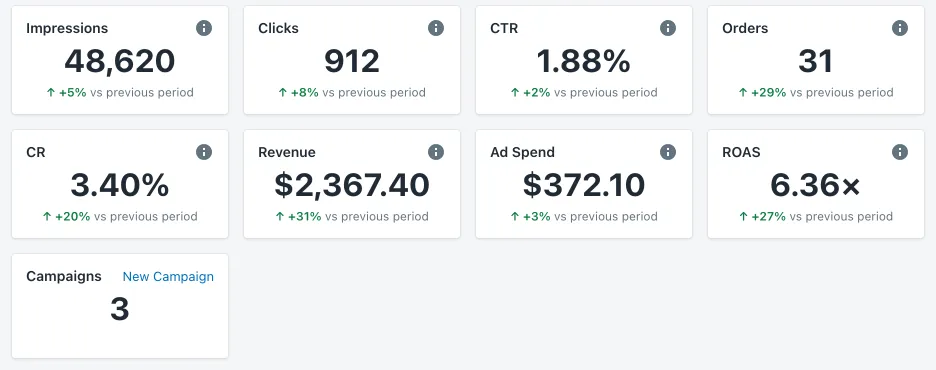
Each card also shows the change against the previous period of the same length — green when it went up, red when it went down. The selected dates appear once, above the cards. The i icon on a card explains it in one sentence.
Ad Spend and ROAS appear on the paid plans, where your plan is a monthly ad budget. On the free Standard plan there is no spend, so these two cards are not shown.
The daily table
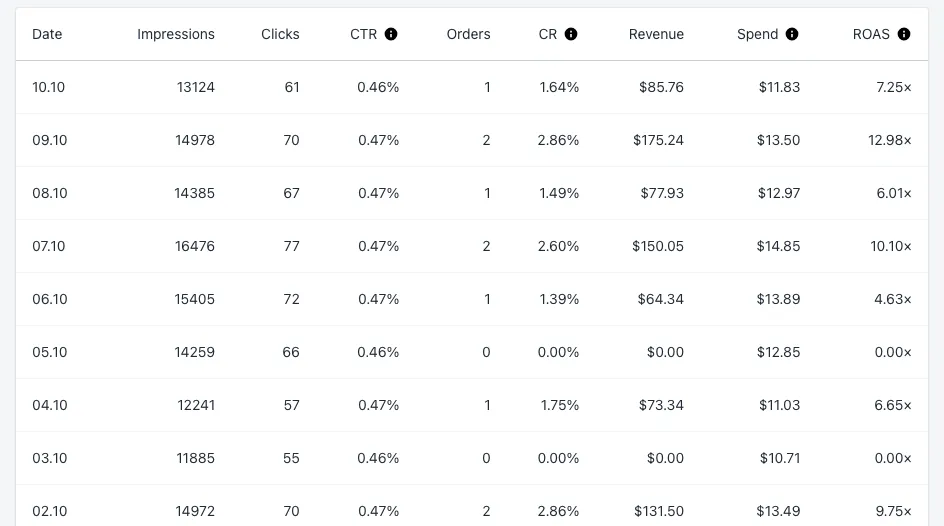
At the bottom, a table lists every day of the period, newest first: date, impressions, clicks, CTR, orders, conversion rate (CR), revenue, spend and ROAS. It is the quickest way to find your best days and to check a single day after a change.
Messages you may see
- Learning phase — new campaigns spend their first weeks testing where your ads work best. A progress bar shows how far they are. Judge results after the learning phase, not during it.
- Your monthly budget is spent — the whole budget of the current month is used. Your ads start again when the next month of your plan begins, or sooner if you raise your budget in Select Plan.
Where to go next
- See which products get clicked in Click Analytics.
- See which websites and apps send visitors in Traffic Sources.
- Compare campaigns side by side in Campaigns.
Questions
They compare the selected period with the period of the same length just before it. 30 days are compared with the 30 days before them.