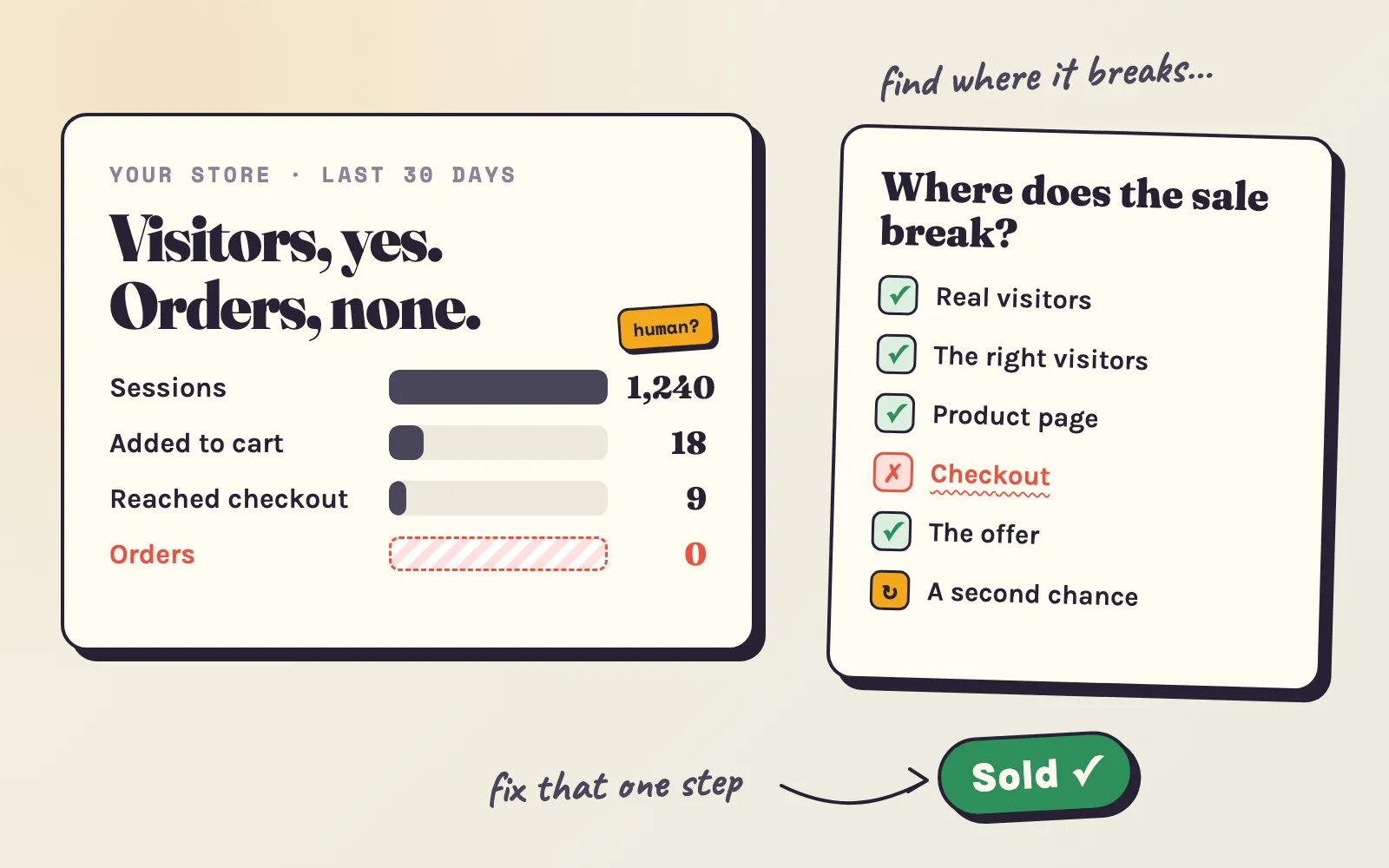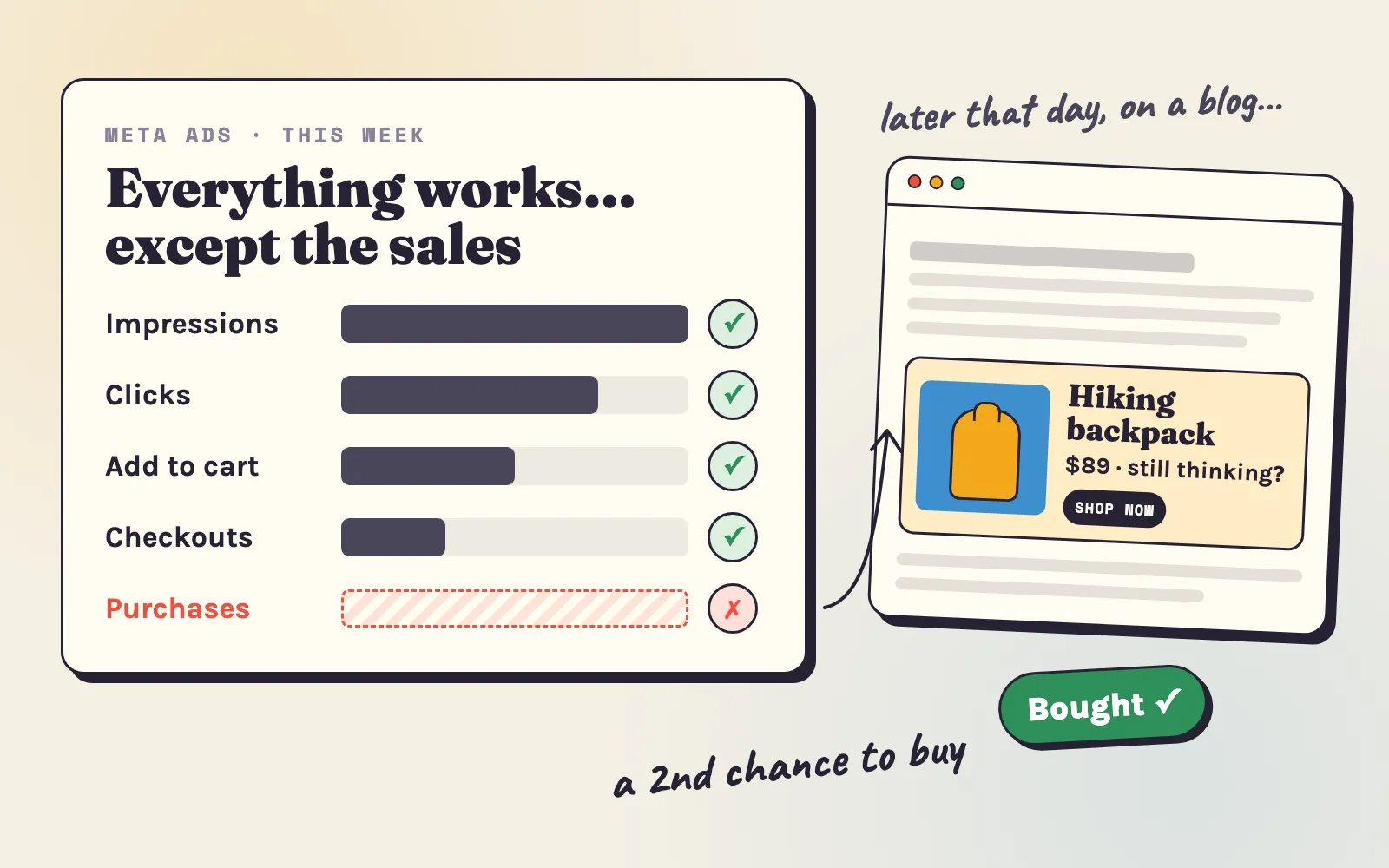

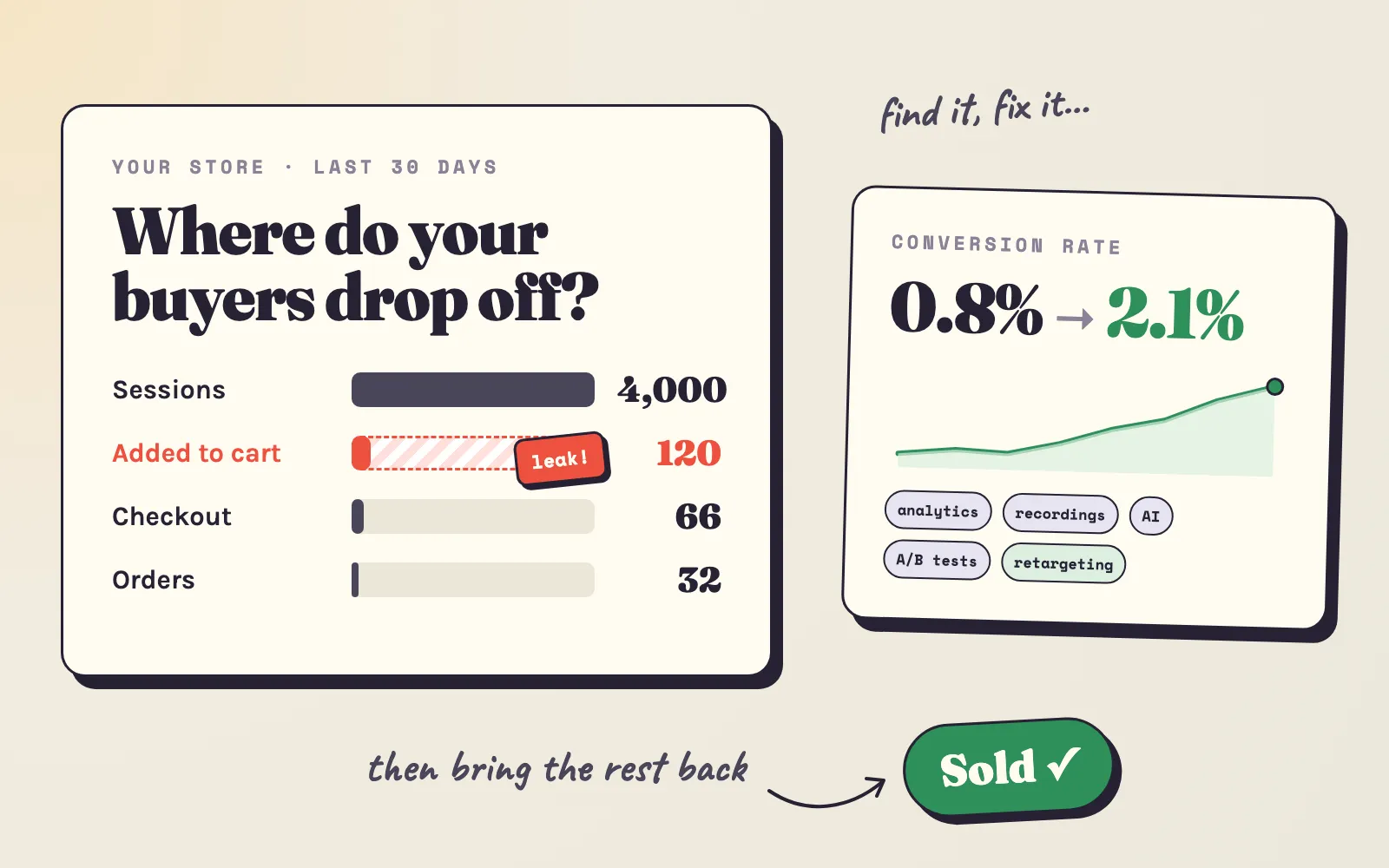
A conversion rate is not one number you fix. It is the result of many small moments: an ad that matches the page, a photo that loads fast on a phone, a shipping price that is shown early, a checkout that doesn’t ask for a password. Most stores with a low conversion rate don’t have ten problems. They have one or two big leaks - and the work is to find them before you change anything.
This guide is built in that order. First, what a good conversion rate is and how to measure yours honestly. Then how to find your leaks with Shopify Analytics, session recordings, your customers’ own words - and AI, which can now do most of the analysis for you. Then the ten most common leaks with fixes, real results from stores that fixed them, and the habits - testing, weekly reviews, bringing visitors back - that keep a store improving long after the first fix.
What is a good Shopify conversion rate?
Your conversion rate is the share of sessions that end in an order: orders ÷ sessions × 100. The average Shopify store converts about 1.4%. The top 20% of stores pass 3.2% and the top 10% pass 4.7% (Littledata benchmark, via Nudgify).
| Average Shopify store | Strong store | |
|---|---|---|
| All sessions | 1.4% | 3.2%+ (top 20%), 4.7%+ (top 10%) |
| Phones | ~1.2% | ~3.9% |
| Desktops | ~1.9% | 6.5%+ |
| Visits from email | 3-5% | - |
| Visits from social media | 0.5-2% | - |
All sessions and devices: Littledata. Email and social: typical ranges published by Nudgify.
What the average hides: a store that sells $15 refills converts far higher than a store that sells $900 sofas, and a store fed by cold social ads converts lower than one fed by email. So use the benchmark to see if you are far off - then compare your store with its own last month.
average3.2%
top 20%4.7%
top 10%you
Below the average Shopify store (1.4%). Most stores here have one or two clear leaks.
- Sales now
- $2,400a month
- Half a point more
- +$1,200$14,400 a year
- At the top 20% rate
- +$5,280a month, same visitors
What matters and what doesn’t
Conversion advice is full of tricks. Most of them move nothing, and some cost you trust. Here is where the effort pays:
Matters a lot
- Who visits. The wrong traffic can't be fixed on the page.
- Speed on phones. Most visits come from a phone, often on mobile data.
- Product pages that answer every question - photos, size, materials, delivery, returns.
- Reviews and other proof that real people bought.
- The total price, shown early - no surprise at checkout.
- A short checkout - guest checkout and one-tap payment.
- A second chance for visitors who leave - email and retargeting.
Matters little, or hurts
- The colour of the buy button.
- Fake countdown timers and "only 2 left" when it isn't true - shoppers notice, and trust goes.
- A full redesign before you know what is broken.
- More apps and pop-ups - each one slows the page and gets in the way.
- Copying a big brand's site - they have a known name; you need more proof.
- Daily swings. Small numbers jump around; read weeks, not days.
- Conversion rate alone. A big discount raises it and can still lose you money.
Rubbish in, rubbish out: get your data right first
Every decision in this guide rests on your numbers. If they are wrong, you will fix the wrong thing - or “fix” a problem that never existed. Spend thirty minutes on this before anything else:
- Take the bots out. About half of all web traffic is automated. In Shopify Analytics, add the filter Human or bot session = Human to every sessions report (Shopify changelog). Without it, a wave of bots looks like a fall in conversion rate.
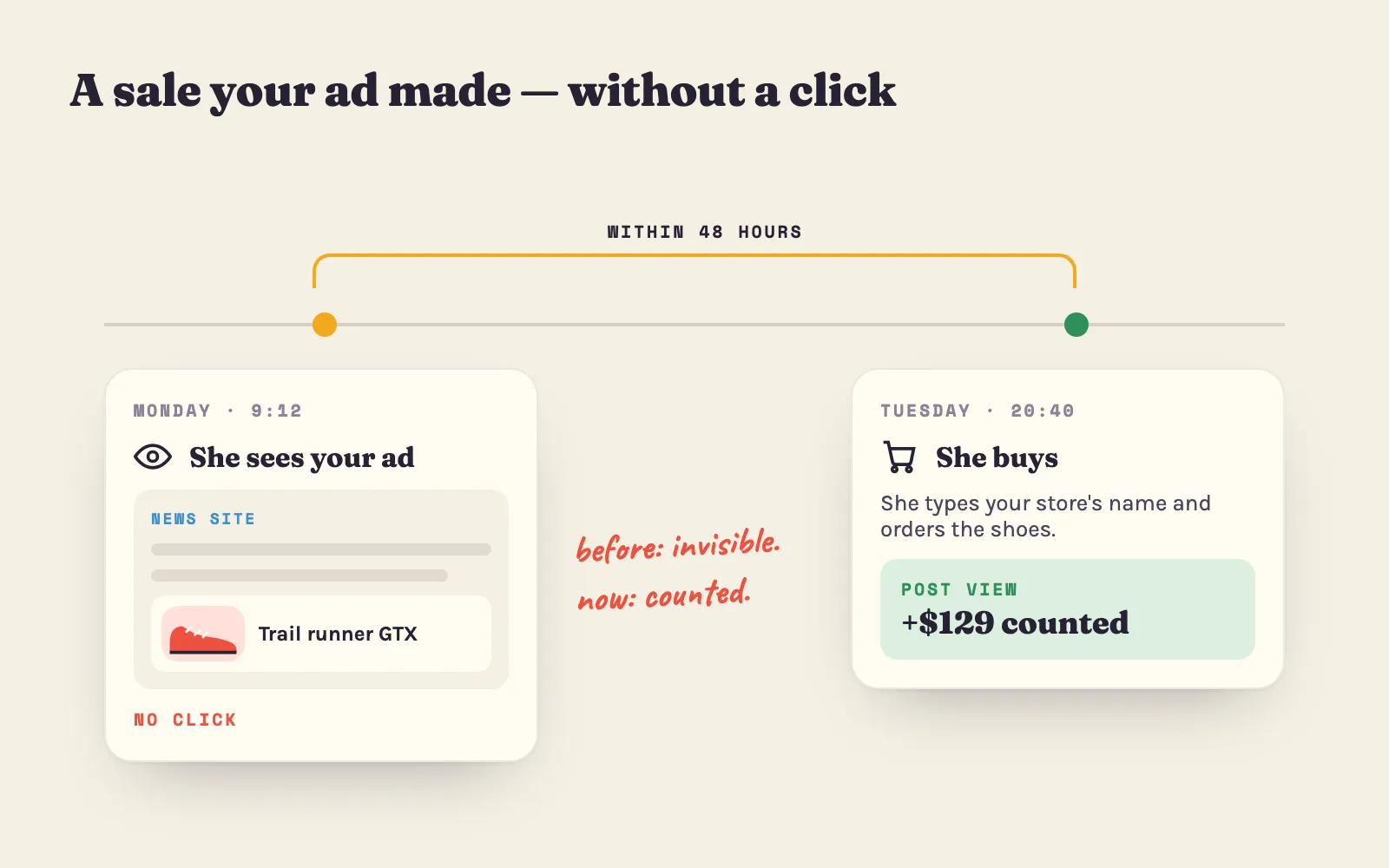
- Use one source of truth for orders. Shopify counts every order. Google Analytics and ad platforms miss some - shoppers who refuse cookies, ad blockers, apps that fail to send the event - and a gap of 10-30% between them is normal. Use Shopify for orders and revenue; use the other tools for where visitors came from.
- Check that no order is counted twice. Two apps sending the same purchase to Google Analytics or an ad platform doubles your sales there - and makes a weak campaign look good. Compare a week of orders in each tool with Shopify; if a tool shows more orders than Shopify, something sends them twice.
- Leave test orders out. Cancel or archive them, and don’t count your own visits on launch days.
- Tag every link you control. Add UTM tags to links in emails, social bios and creator posts, so Shopify can show which source brought which orders. Untagged visits land in “direct” and tell you nothing. The free UTM builder for Shopify has presets for each and shows the channel every link lands in.
- Compare like with like. The same weekdays, the same season, at least two full weeks. October before Black Friday, a holiday or a sale week can change your rate more than any fix.
- Keep a change log. One line per change: the date and what changed - a new theme section, an app, a price, a new ad. When a number moves, the log tells you why.
- Sessions from one cityMany visits from a single city, often one you don't sell to, with 0-second visits. Bots.
- A sudden jump in "direct"Direct traffic with no referrer rising overnight. Bots, or links without UTM tags.
- More orders in an ad tool than in ShopifyThe same purchase is sent twice, or the tool counts views as sales.
- A conversion rate above 10-15%Sessions and orders from different periods, or sessions not counted on some pages.
The numbers to track, and your north star metric
Your revenue is three numbers multiplied together - and conversion rate is only one of them:
A north star is the one number you look at first every week - the one that says whether the store is getting better. For most stores it should be revenue per visitor (revenue ÷ sessions). It can’t be gamed the way conversion rate can: a 30%-off code may lift conversion rate and still leave you with less money.
Pick a different north star if your business works differently:
- You sell refills, food, pet supplies or beauty - things people buy again: revenue from returning customers, or the share of customers who order again within 90 days. Your profit is in the second and third order.
- Your margins are thin, or you spend a lot on ads: profit per visitor - revenue per visitor minus product, shipping and ad costs per visitor.
- You sell expensive items with a long decision (furniture, bikes, jewellery): add-to-cart rate or email signups per visitor, because orders are too few to read every week.
Then track the steps that feed it:
| Number | How to calculate | Where in Shopify | A typical store |
|---|---|---|---|
| Add-to-cart rate | Sessions with cart additions ÷ sessions | Conversion rate breakdown | About 6% (under 3% is a product page problem) |
| Cart to checkout | Sessions that reached checkout ÷ sessions with cart additions | Conversion rate breakdown | About half |
| Checkout completion | Sessions that completed checkout ÷ sessions that reached checkout | Conversion rate breakdown | About half |
| Conversion rate by device | The same, grouped by device type | Sessions by device type | Phones about 1.2%, desktops 1.9% |
| Returning customer rate | Customers with 2+ orders ÷ all customers | Customers reports | About 25% |
| Cost per order | Ad spend ÷ orders from ads | Your ad tools, checked against Shopify | Below your profit per order |
Typical rates: the published benchmarks quoted in this guide; the returning customer rate is from a study of 1,500+ Shopify stores by Little Stream Software.
Use the free CPA calculator for the most you can pay for an order, and the customer lifetime value calculator for what a returning customer is worth.
Find where visitors drop off
Now find the leak. Work from the numbers to the reasons: the numbers say where buyers leave, recordings and surveys say why.
Step 1: read your funnel
In your Shopify admin, open Analytics > Reports, find the conversion report (Conversion rate breakdown), filter it to human sessions and set the last 30 days. Write down four numbers: sessions, sessions with cart additions, sessions that reached checkout and sessions that completed checkout. Type them here:
Biggest leak: Visit → add to cart. At a typical rate there, the same visitors would give about 32 more orders. How to fix it
The step with the lowest bar is where to start. A fix further down the funnel does little while a step above it leaks - a perfect checkout can’t help visitors who never add to cart.
Step 2: split the numbers
An average can hide one broken part of the store. Open the same report and group it by each of these, one at a time:
| Split by | What to look for | What it usually means |
|---|---|---|
| Device type | Phones convert less than half as well as desktops | Speed, layout or checkout on phones (leak 2) |
| Referrer / traffic source | One source with many sessions and almost no orders | The wrong visitors, or an ad that promises something else (leak 1) |
| Landing page | A page with many sessions and a low add-to-cart rate | That page doesn’t convince (leak 3) |
| Product | Many views, few add-to-carts | Price, photos or missing information on that product |
| Country | Visits from places you don’t ship to, or with a foreign currency | Targeting or local prices and shipping |
| New vs returning | Returning visitors convert much better (normal) - but few return | No second chance (leak 10) |
Also open Top online store searches with no results in your reports. Every search there is a shopper who wanted something and didn’t find it.
Which leak first? Multiply the sessions it touches by the size of the gap. A product page with 2,000 visits a month and half the normal add-to-cart rate is worth more than a perfect fix on a page with 50 visits.
Step 3: watch session recordings
Numbers show where visitors leave. Recordings show what they did just before. A session recording tool replays real visits - the scrolls, taps and hesitations - with personal details hidden. Microsoft Clarity is free, has a Shopify app and needs no code; Hotjar and Lucky Orange are well-known alternatives.
How to watch them without losing an afternoon:
- Install the tool and wait a week, until it has a few hundred sessions.
- Start with one question from step 1 or 2 - for example, “why do phone visitors leave the product page without adding to cart?”
- Filter the recordings to match it: device = mobile, visited a product page, did not add to cart. Also try the built-in filters for rage clicks (repeated taps in one spot), dead clicks (taps on things that don’t respond) and quick backs (visitors who leave a page within seconds).
- Watch 10 to 20 recordings and count what you see. One visitor stuck is a story; seven out of twenty is a leak.
- Open the heatmaps of your top pages. The scroll map shows how many visitors reach your reviews, your shipping line or your add-to-cart button. The click map shows taps on photos that don’t zoom and text that looks like a link but isn’t.
On most Shopify plans, recording tools can’t see inside Shopify’s checkout pages. For the checkout, use Shopify’s own numbers: sessions that reached checkout against sessions that completed it.
Treat recordings with care: tell visitors in your privacy policy, and in the EU, ask for consent before recording.
Step 4: watch five people buy
The cheapest research there is. Ask three to five people who match your buyers - not your family if they aren’t - to find and buy a product on their own phone while they talk out loud. Don’t help. Write down every pause, every “hmm”, every question. Five people find most of the big problems, because they all trip over the same ones.
Let AI do the analysis for you
Two years ago, finding leaks meant hours in spreadsheets and recordings. Today AI can do most of that work in minutes: read your reports, compare periods, spot the segment that drags the average down, summarise hundreds of recordings and survey answers, and write the fix - a new product description, a shipping line, an FAQ block.
Three ways to use it today:
- Sidekick, inside your Shopify admin. Ask it in plain words: “Which products had the most views but the fewest add-to-carts in the last 30 days?” or “Compare conversion rate on mobile and desktop this month and last month.” Since April 2026, Shopify also shows its five most important findings at the top of the analytics dashboard each day; See why opens the report with Sidekick ready for follow-up questions (Shopify changelog).
- Your recording tool’s AI summary. Clarity’s Copilot summarises recordings and heatmaps, so you can read what 200 sessions had in common instead of watching them all.
- A chatbot with your exports. Export the reports from step 1 and 2 as CSV files (each Shopify report has an Export button), add screenshots of your product page on a phone, and give them to ChatGPT, Claude or Gemini with a clear prompt. Three that work - fill in the brackets:
You are an ecommerce conversion analyst. Attached are exports from my Shopify store for the last 30 days and the 30 days before: the conversion rate breakdown (sessions, sessions with cart additions, sessions that reached checkout, sessions that completed checkout), the same grouped by device type, by referrer source and by landing page, and a products report with views and add-to-carts.
1. Calculate each funnel step for both periods and show the changes in a table.
2. Find the 3 segments (device, source, landing page or product) that lose the most orders. Estimate lost orders as sessions × the gap to my store's average.
3. For each one, give the 2 most likely causes and one specific fix I can make this week, without code if possible.
4. Tell me which numbers are unreliable (samples too small, traffic that looks like bots) and what to check.
My store sells [what you sell] to [who buys], average order about $[amount].
Act as a demanding first-time shopper on a phone. Here is my product page: [link, or screenshots of the whole page on a phone]. My buyers are [who] and they usually compare me with [a competitor].
List, in order of how much it hurts the decision to buy: every question the page leaves open, every reason to doubt the store, and every bit of friction before "Add to cart". For each one, give the exact fix - the new text, the photo to add, or what to move higher.
Then rewrite the first screen: the product title, the price line, three short bullet points and the line under the button.
Below are [my notes from 20 session recordings / answers to my exit survey / my 1-3 star reviews] from my Shopify store.
Group them into themes, count how often each theme appears, quote one typical example for each, and rank the themes by how many sales they probably cost.
For the top theme, suggest one test: what to change, what I expect to happen, and which number in Shopify will show whether it worked.
Three rules keep AI useful:
- Check its numbers. AI can misread a column or invent a figure that sounds right. Check every number it quotes against the Shopify report before you act on it.
- Never upload personal data. Remove customer names, emails, phone numbers and addresses from any export. Funnel and product reports don’t need them.
- AI suggests, you test. Treat every idea as a guess to check - with a before-and-after comparison or an A/B test (below) - not as a fact.
The 10 most common leaks and how to fix them
These are the leaks we see most often in small Shopify stores, roughly in the order of the funnel. For each: how to spot it, and how to fix it - first without code, then with.
Leak 1: the wrong visitors
How you spot it: one traffic source with many sessions and almost no add-to-carts; visits of 0-10 seconds; visitors from countries you don’t ship to; recordings where people leave before they scroll.
Fix it:
- Match the ad to the page. If the ad shows the red dress at $49, the link opens the red dress at $49 - not your home page, not a collection where the shopper has to search again.
- Narrow the targeting. Pick audiences and placements close to what you sell. On Adeagle, choose the product categories and shopper interests, so your ads appear on pages about what you sell rather than anywhere a cheap view is for sale.
- Move the money. Pause the sources whose visitors don’t stay, and give their budget to those whose visitors add to cart. Judge sources on orders and revenue per visitor, not on clicks.
Leak 2: slow pages on phones
How you spot it: phones convert less than half as well as desktops; PageSpeed Insights shows a mobile Largest Contentful Paint over 2.5 seconds for your product page; recordings show visitors leaving before the page has finished loading.
Speed pays more than almost anything else. In a study by Deloitte for Google, retail sites that became 0.1 seconds faster on mobile saw 8.4% more conversions (web.dev). In Portent’s study, ecommerce pages that loaded in 1 second converted 2.5 times better than pages that loaded in 5 seconds (Portent).
Fix it, without code:
- Compress large images before you upload them; keep product photos under about 300 KB.
- Remove apps you no longer use - and check that they didn’t leave their code in your theme.
- Drop sliders, autoplay video and pop-ups from the first screen.
- Use a light, current theme - Shopify’s free Dawn and its newer themes are fast.
With code: delay scripts that the first screen doesn’t need, preload the main product image, and set image sizes so the page doesn’t jump while it loads.
Leak 3: the product page does not answer questions
How you spot it: many views and few add-to-carts on a product; recordings of visitors zooming photos, scrolling up and down, opening the size menu again and again; questions by email that the page should have answered.
A shopper can’t touch the product or ask you. The page has to answer everything they would ask in a shop:
- PhotosFive or more: the product alone, in use, in someone's hand for scale, close-ups of the material. Photos that zoom on a phone.
- A short video15-30 seconds of the product in use answers more than a paragraph.
- Benefit first, specs secondOne line on what it does for the buyer, then sizes, materials, care - in short lines that read well on a phone.
- Size and fitA size guide next to the size menu, with measurements and "fits true to size" from reviews.
- Delivery and returns at the button"Ships in 1-2 days · Free returns for 30 days" under the price, not on a page nobody opens.
- Questions answeredA short FAQ block with the five questions customers really ask you.
- The phone testOn your phone: is the price and the buy button visible without scrolling? Does a sticky buy button follow the shopper down the page? Is every variant clear, and are sold-out ones marked?
With AI: use prompt 2 above on your top product page. It is very good at finding the questions a page leaves open.
Leak 4: no proof that others bought
How you spot it: products with no reviews convert much worse than those with reviews; new visitors leave the product page after a few seconds.
Reviews are one of the strongest levers there is. In research by the Spiegel Research Center, a product with five reviews was 270% more likely to be bought than a product with none - and for a higher-priced product, displaying reviews raised conversion by 380% (Spiegel Research Center). Perfect scores don’t help most: purchase likelihood peaked at an average of 4.2-4.5 stars and fell as ratings got close to 5, because shoppers distrust them (Spiegel and PowerReviews).
Fix it:
- Install a review app and send an automatic request a few days after delivery - not at the order, when the customer hasn’t used the product yet.
- Ask for photos. A customer photo answers “what does it really look like?” better than your studio shot.
- Show the star rating and the review count next to the product title.
- Answer bad reviews politely and in public. A fair answer to a complaint builds more trust than ten 5-star reviews.
- Never buy or fake reviews. Shoppers spot them, platforms remove them, and in many countries they are illegal.
Leak 5: surprise costs and slow delivery
How you spot it: many carts and checkouts, few orders; recordings of shoppers leaving at the shipping step.
In Baymard Institute’s survey, 40% of shoppers who left a checkout named extra costs that were too high - shipping, taxes, fees. 20% left because delivery was too slow, and 12% because they couldn’t see the total cost up front (Baymard Institute).
Fix it:
- Show shipping on the product page and in the cart - the price and the delivery date: “Free delivery over $70 · Arrives Thu-Mon”.
- Set a free-shipping threshold a little above your average order. If your average order is $55, free shipping over $65-70 turns the cost into a reason to add one more item. In a FedEx survey, 81% of shoppers said they would add items to reach a free-shipping threshold (FedEx).
- Include taxes and duties where shoppers expect prices with them - in the EU and the UK, and for international orders through Shopify Markets.
- Offer a faster option if your standard delivery is slow, even at a price.
Leak 6: the store does not look trustworthy
How you spot it: new visitors leave quickly; the “About” and “Contact” pages get many visits before checkout; survey answers say “wasn’t sure you were real”.
Almost one in five shoppers who leave a checkout didn’t trust the site with their card details. A new store loses more sales to doubt than to price. Fix it:
- An About page with real faces and a short story - who you are, where you ship from, why you started.
- Contact details that work: an email address on your own domain, a phone number or a chat, a country.
- Policies linked in the footer - shipping, returns, privacy - written in plain words.
- Payment brands shoppers know - Shop Pay, PayPal, Apple Pay, Google Pay. Shoppers trust them with a card more than an unknown store.
- No loose ends: broken links, typos, “lorem ipsum”, a footer that says © 2022, an Instagram link to an empty account. Each one says “nobody looks after this shop”.
Leak 7: a checkout with friction
How you spot it: about half or fewer of the checkouts that start become orders; complaints about payment; errors after an app or theme update.
Fix it:
- Make accounts optional. In Settings > Customer accounts, check that shoppers can check out as guests. 18% of shoppers who abandoned named a forced account.
- Turn on one-tap payment - Shop Pay, Apple Pay, Google Pay, PayPal - and show those buttons in the cart and on the product page. They fill in the address and card for the shopper.
- Offer pay-later options (Shop Pay Installments, Klarna) if your average order is above about $100.
- Watch the discount-code box. A visible empty code field sends shoppers off to search for a code - and some don’t come back. Put codes in links (yourstore.com/discount/CODE applies it automatically) when you run a promotion.
- Place a test order on your phone every month and after every app or theme change. Errors and crashes cost 17% of the shoppers who abandon.
The classic example: a large retailer replaced the “Register” button in front of its checkout with a “Continue” button and the line “you don’t need an account to buy”. The number of customers who bought rose by 45% - about $300 million in the first year (The $300 Million Button). Baymard estimates that large stores could raise conversion by 35% through better checkout design alone.
Leak 8: shoppers can’t find the product
How you spot it: many searches with no results; visitors who open the menu, then leave; recordings of shoppers paging through long collections.
Shoppers who search usually know what they want: in Econsultancy’s research, visitors who used site search were about 1.8 times more likely to buy (via Yext). Fix it:
- Name the menu the way buyers think - “Dresses”, “Gifts under $50” - not “Collection 3” or “New Drop”.
- Add filters to big collections: size, colour, price, in stock.
- Fix the zero-result searches. Every month, open the report of searches with no results; add synonyms (“hoodie” = “sweatshirt”), fix spelling, or add the product people ask for.
- Sort collections by best sellers, not by date.
Leak 9: an offer that does not stand out
How you spot it: visitors view many products, add nothing, and leave; survey answers say “found it cheaper” or “just looking”; every fix above is done and the rate is still low.
Fix it:
- Compare your total price - product plus shipping - with three competitors a shopper would find on Google. If you are more expensive, the shopper needs a reason.
- Give the reason: a bundle, a longer guarantee, faster delivery, a story of who makes it, a size or colour nobody else has.
- Don’t train shoppers to wait. A sitewide discount every month teaches them never to pay full price. Use offers with a reason: first order, a bundle, a season.
- Check the product itself. If the same item is sold by dozens of stores, price is the only difference - and that race is hard to win.
Leak 10: no second chance
How you spot it: almost no returning visitors; no abandoned checkout emails sent; no way to reach a visitor who leaves without buying.
Most buyers don’t buy on the first visit. If nothing brings them back, every visitor who leaves is lost. This leak is big enough for its own section - bring back the visitors who didn’t buy below.
What fixing one leak did for real stores
These are published results - each from one leak, found and fixed, and measured:
The page's main content loaded 31% faster. Everything else stayed the same.
web.dev case studyCore Web Vitals fixes on the store; revenue per visitor rose 53%.
web.dev case studyThree months of performance work on the mobile store; load time fell 23%.
web.dev case study"Register" replaced by "Continue" - no account needed to buy. $300 million more in a year.
The $300 Million Buttonto be bought with five reviews than with none - 380% for a higher-priced product.
Spiegel studyA US electrical-supplies store: $204 of Adeagle over seven months brought 10 orders worth $5,830, all after retargeting ads.
See belowWhat they have in common: nobody redesigned everything. Each found one specific leak, fixed it, and measured.
A/B testing: how to know a change worked
An A/B test shows half of your visitors the current version (A) and half a new one (B) at the same time, and compares the results. Because both groups shop in the same week, with the same ads and the same weather, the difference comes from your change - not from the season.
On Shopify, you don’t need an app for themes: Rollouts (in your admin under Markets, or next to your theme in Online Store > Themes) can run an experiment between two versions of your theme on the Grow plan and above, and reports conversion rate and add-to-cart rate for each (Shopify Help Center). Testing apps do the same for other plans.
The catch is traffic. A small difference needs a lot of visitors to tell it apart from chance:
- Sessions per version
- 30,357for each of A and B
- Orders per version
- 425at today's rate
- Test length
- 31 weeksall traffic split 50/50
Too long for an A/B test. Make the change, then compare 4 weeks before with 4 weeks after - or test a bigger change.
Rules for tests that tell the truth:
- Start with a reason. “Recordings show 9 in 20 visitors look for shipping costs, so a shipping line under the price will raise add-to-cart rate.” A test without a reason teaches you nothing, win or lose.
- Test big changes. A new first screen, free shipping, a different main photo - not a button colour. Small stores only have the traffic to find big differences.
- Run full weeks, at least two, so every weekday is in both versions. Don’t stop early when one version leads; early leads often vanish.
- Judge by orders and revenue per visitor, not by clicks.
- Expect most ideas to fail. In Optimizely’s analysis of 127,000 experiments, only 12% produced a significant win on their main metric (Optimizely). That is why you test - an idea that loses in a test would have quietly lost money as a permanent change.
- Keep a test log: the idea, the dates, the result, what you learned. A losing test is still a lesson.
Not enough traffic? Make the change and compare four full weeks before with four full weeks after, in the same season, with no other change in between - your change log makes this possible. It is weaker evidence than an A/B test, but much better than guessing.
Weekly and monthly reviews
Fixes give you a jump. Reviews give you growth: a store that looks at the same numbers every week finds the next leak while it is still small - a broken app, a source that stopped converting, a product that sold out.
- Every week, same dayWeekly - 30 minutesYour north star against the last four weeks. The three funnel steps. Conversion rate on phones and desktops. Your top five landing pages. Anything down more than 20%: find out why. Watch 10 new recordings, read new reviews and survey answers, and pick one fix for the week.
- First week of the monthMonthly - 2 hoursThe last 30 days against the month before and the same month last year. Splits by device, source, landing page and product. Returning customer rate. Cost per order and ROAS by channel. The test results. A test order on your phone. Plan one to three changes for the month.
- Every three monthsQuarterly - half a dayYour prices and offer against three competitors. Page speed. Remove the apps you don't use. A new round of "watch five people buy". Is your north star still the right one?
A template for the weekly review - copy it into your notes app, a doc or a spreadsheet:
Weekly review - week of [date]
North star (revenue per visitor): this week $[ ] | average of the last 4 weeks $[ ]
Conversion rate [ ]% | add to cart [ ]% | cart to checkout [ ]% | checkout to order [ ]%
Phones [ ]% | desktops [ ]%
Top 5 landing pages - sessions and conversion rate: [ ]
Anything down more than 20%? Why? [ ]
What changed this week (change log): [ ]
10 recordings watched - new problems: [ ]
New reviews and survey answers - themes: [ ]
One fix for next week: [ ]
Let AI help here too: paste last week’s and this week’s exports into a chatbot with the template and ask it to fill in the numbers and flag what changed. You keep the last step - deciding what to fix.
Ask your customers, and keep them coming back
Numbers and recordings show what people do. Only people can tell you why. And the customers who already bought are the easiest sales you will ever make.
Surveys that tell you what to fix
- A post-purchase survey on the thank-you page or in the order email. Response rates are high - often 30% or more - because the customer just said yes to you. Ask one or two questions:
- “What almost stopped you from buying today?” - your list of leaks, in your buyers’ words.
- “How did you first hear about us?” - fills the gaps your tracking leaves.
- An exit or cart survey for visitors who leave without buying. Fewer answer - typically 5-15% - so ask one multiple-choice question: “What stopped you from buying today?” with options such as shipping cost, delivery time, not sure about the size, just looking, found it cheaper, and “other”. Show it on desktop when the cursor leaves the page; on phones, use a small banner, never a full-screen pop-up.
- A satisfaction question after delivery. “How happy are you with your order, from 1 to 5?” or “How likely are you to recommend us, from 0 to 10?” Reply personally to every low score - it is often a refund or a courier problem you can still fix. Ask every high score for a review.
Shopify Forms, your email tool or a survey app can run all three. Then put the answers through prompt 3 above, and you have a ranked to-do list in your buyers’ own words.
Make customers stay, and come back
Returning visitors convert far better than new ones. In a panel of 24 direct-to-consumer stores, returning visitors converted at 2.17% against 0.85% for new visitors; they were 19% of sessions but 37% of revenue (Top Growth Marketing). A store whose customers come back has a higher conversion rate without changing a single page.
- A post-purchase email flow: a thank-you, how to use or care for the product, a review request after delivery, then a reminder when it is time to reorder (refills, food, cosmetics).
- Support that answers fast - the same day. An answered question is often a saved order and a loyal customer.
- Easy returns. A clear, simple returns policy makes the first order easier and the second more likely.
- A reason to return: a simple reward on the next order, early access to new products, back-in-stock alerts for sold-out items.
- A win-back email 60-90 days after the last order, for customers who haven’t come back.
- The parcel itself: careful packaging and a small card with a thank-you and a QR code to reorder.
Bring back the visitors who didn’t buy
Here is the leak most stores never fix: most visitors don’t buy on their first visit. They look, leave, compare - and come back, if something brings them back.
So a visitor who leaves today is not lost. Every one you bring back is a sale the store already paid for - and because returning visitors convert so much better, each one lifts your conversion rate too. Three ways, from free to paid:
- Collect the email on the first visit. A short sign-up form with a small first-order reward is enough. Then send a short welcome series that introduces the store and its best sellers.
- Switch on the abandoned checkout email. Shopify sends it for free - check that it is on under Marketing > Automations, and that the text sounds like you. On average, abandoned cart emails turn 3.3% of recipients into orders, and the best 10% of senders reach 7.7% (Klaviyo).
- Retarget the visitors who didn’t buy. Most visitors never leave an email, so email can’t reach them. Retargeting can: it shows a visitor the products they looked at, later, on other sites they visit - and brings them back to finish the purchase.
Retargeting with Adeagle. Adeagle shows the products a visitor viewed in your store as ads on other Shopify stores, blogs and apps they visit. Retargeting ads are clicked 6 to 12 times more often than ads shown to new shoppers, because the shopper already knows the product - and every click is a returning visitor, the kind that converts best.
You can add Adeagle from the Shopify App Store and switch retargeting on in a few minutes. If you advertise on Meta too, this guide shows why a second channel often closes the sales social ads start.
More ways to lift conversion
Beyond the ten leaks, these help many stores - pick the ones that fit yours:
- Local prices and languageShow prices in the shopper's currency, with local shipping, through Shopify Markets. A price in a foreign currency adds a doubt.
- Prepare for peak seasonBefore Black Friday and Christmas: test the store on a phone, publish shipping cut-off dates, build gift guides, and have your offers ready before October ends.
- Bundles and "complete the set"They raise the order value - and revenue per visitor - even when conversion rate stays the same.
- Back-in-stock alertsA sold-out product with a "notify me" button keeps the shopper; one without loses them to a competitor.
- Chat for expensive productsAbove about $150, a quick answer from a person often decides the sale.
- Landing pages for campaignsOne page per offer, with the product, the proof and the button - no menu full of exits.
- Readable on any screenText of 16 px or more, strong contrast, buttons big enough for a thumb. It helps every shopper, not only those with poor eyesight.
- Guarantees"Love it or your money back within 30 days" removes the risk the shopper feels - and few take you up on it.
A 30-day plan
| Week | What to do |
|---|---|
| 1 | Clean your data: human sessions only, one source of truth, UTM tags, a change log. Read your funnel with the leak finder above. Install a recording tool. Place a test order on your phone. |
| 2 | Watch 20 recordings for your weakest step. Add a post-purchase and an exit survey. Give your exports to AI with prompt 1. Choose your top three leaks by sessions × gap. |
| 3 | Fix the biggest leak - usually the product page, shipping costs or the checkout. Start with your most-viewed product. Note every change in the log. |
| 4 | Build your second chance: email sign-up, abandoned checkout email, retargeting. Do your first weekly review, and plan your first A/B test - or a four-week before-and-after check. |
After that, the weekly review keeps you finding the next leak. Most stores don’t need a new theme or a new trick. They need to find what is broken, fix one thing at a time, and bring back the visitors who weren’t ready the first time.
Free tools to plan it
- Conversion rate calculator - your rate next to other Shopify stores, what a higher one is worth, and the leak finder.
- A/B test calculator - how long a test must run, and whether a finished one proves anything.
- UTM builder for Shopify - tagged links for social, email and creators, so you know which source sells.
- CPA calculator - what one order may cost you in ads, and the most you can pay.
- ROAS calculator - the return your ads need at your margin.
- Customer lifetime value calculator - what a customer who comes back is worth.
- CPC calculator - how many visitors a budget buys.
- Still at zero sales? Start with no sales on Shopify - it covers the earlier steps.
Sources: Littledata Shopify conversion benchmarks (via Nudgify); Baymard Institute cart abandonment rate (updated September 2025); Deloitte for Google, “Milliseconds make millions”; Portent site speed study; web.dev case studies: Vodafone, Rakuten 24, Swappie; Spiegel Research Center, “How Online Reviews Influence Sales”; Spiegel and PowerReviews on star ratings; Jared Spool, “The $300 Million Button”; Econsultancy on site search (via Yext); FedEx free shipping survey; Optimizely, 127,000 experiments; Top Growth Marketing, returning vs new customers; Klaviyo abandoned cart benchmarks; Shopify changelog on bot filtering and analytics insights; Shopify Help Center, Rollouts; Adeagle data on visits per order (a sample of 112 stores, 2026) and retargeting.
Questions
The average Shopify store converts about 1.4% of its sessions into orders. Above 3.2% puts a store in the top 20%, and above 4.7% in the top 10%. Phones convert lower than desktops (about 1.2% against 1.9%), and cheap, repeat-purchase products convert higher than expensive ones, so compare your store with its own last month first.
Usually because of one or two leaks - visitors who are not your buyers, slow pages on phones, product pages that leave questions open, too few reviews, shipping costs that appear only at checkout, or a checkout with friction. Shopify's conversion funnel shows which step loses the most visitors, and session recordings show why.
Divide orders by sessions in the same period and multiply by 100. 40 orders from 4,000 sessions is a 1% conversion rate. Use human sessions only - in Shopify Analytics, filter "Human or bot session" to Human - so bots don't hide your real rate.
A clear fix - shipping costs shown on the product page, guest checkout switched on, a broken mobile menu repaired - shows up within two to four weeks. Judge it on at least two full weeks of data, compare the same weekdays and season, and change one thing at a time so you know what worked.
Only for big changes. At a 1.4% conversion rate, finding a 20% lift needs about 30,000 sessions per version. Below that, make the change and compare four weeks before with four weeks after, and use session recordings and surveys to decide what to change.
Yes. Returning visitors convert about two to three times better than new ones, and many buyers need several visits before they order. Retargeting shows visitors who left the products they looked at, on other sites they visit, and brings them back to finish the purchase.
Most visits come from phones, but phones convert lower - about 1.2% against 1.9% on desktop for Shopify stores. The usual causes are slow pages, a buy button below the first screen, pop-ups that cover the page, small photos and long forms. Open your own store on a phone, on mobile data, and buy something.
AI can find the leaks and suggest fixes. Shopify's Sidekick answers questions about your store data, session recording tools summarise recordings, and chatbots such as ChatGPT, Claude or Gemini can analyse exported reports and review your product pages. Check every number it gives you against Shopify, and never upload customer names, emails or addresses.
Surprise shipping costs are the most common reason shoppers leave at checkout - 40% of those who left named extra costs that were too high. Free shipping above an order value a little higher than your average order removes the surprise and raises order value, because most shoppers will add an item to reach it.
Check the data first - a jump in bot traffic, a new traffic source or a broken tracking app can change the rate without any real change in sales. Then place a test order on your phone - apps and theme updates often break the cart or checkout. Finally, compare with the same weeks last year - October, for example, is when many shoppers wait for Black Friday.