
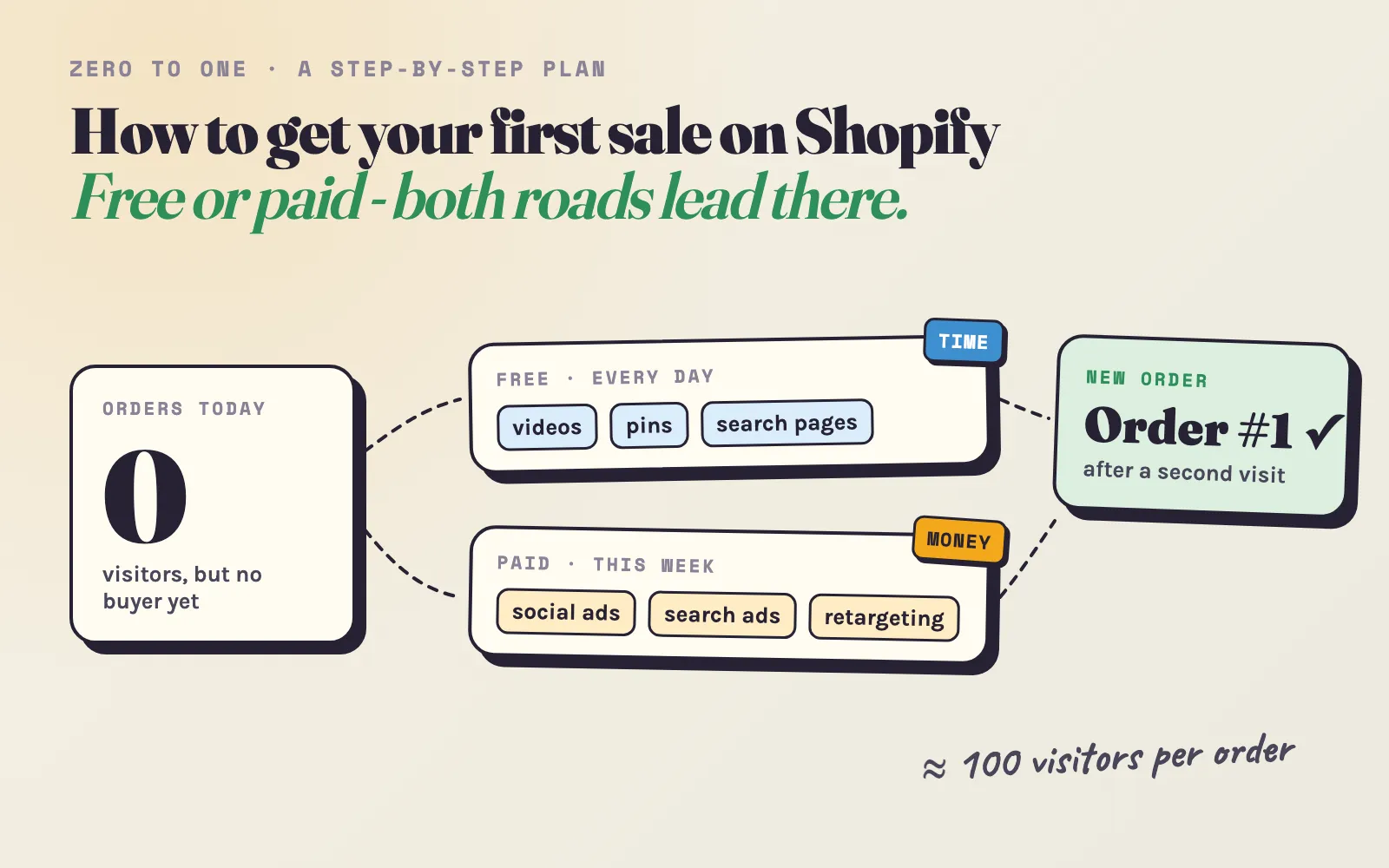
You opened the store, added the products and told a few people about it. The orders counter still says zero. If that is your store today, you are not alone: “How do I make my first sale?” is what many new merchants tell us they were searching for when they found Adeagle.
The first sale feels like a wall, but it is mostly math and routine. You need enough of the right visitors, a store that does not lose them, and a way to bring back the ones who did not buy the first time. This guide gives you a plan for all three - first the free methods, which cost time, then the paid ones, which cost money but are faster. Every step is something you can start today.
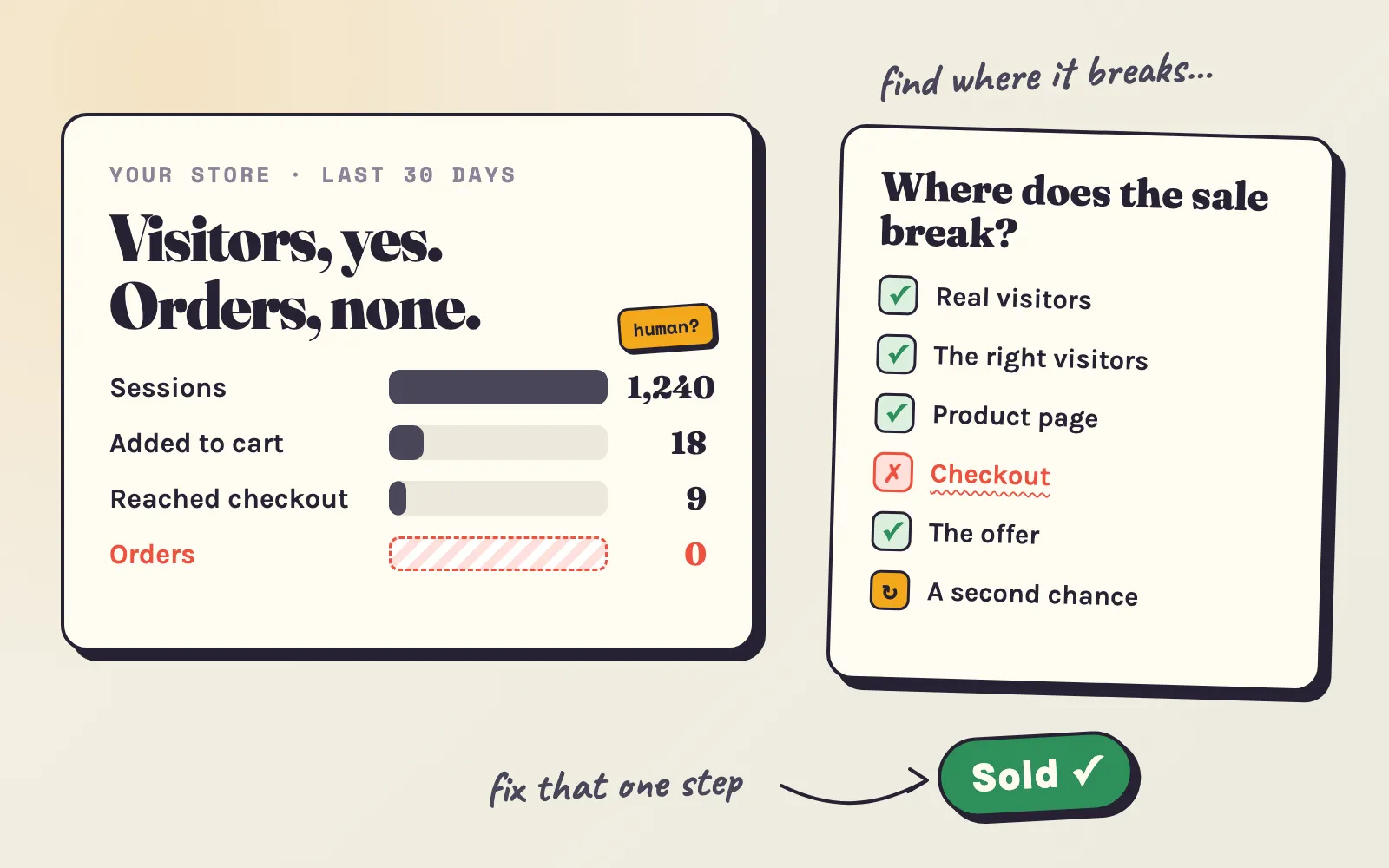
Already have a few hundred visitors and still no order? Then the problem is likely inside the store, not in the traffic - start with our guide to no sales on Shopify, which finds the step where the sale breaks.
- Day 1Make the store readyOpen it, test the checkout, show shipping costs, and ask your first circle for honest reviews.
- Every dayDo the free workOne short video, a few pins, one helpful answer, one page Google can find. It costs time, and it keeps working later.
- When you canPay to go fasterFacebook and Instagram ads to find buyers, Google for people who already search, Adeagle for discovery in other stores and apps.
- From the startBring visitors backEmail capture, the abandoned checkout email and retargeting. Many buyers order on their second or third visit.
- Weeks 2-5The first ordersAbout 100 real visitors per order, and usually a few weeks - not a few days.
How many visitors does the first sale take?
Before you choose any method, know the target. A new store with cold traffic - people who do not know it yet - turns about 1 in 100 visitors into an order. The median Shopify store converts 1.3% of its sessions, and first-time visitors less than that (Littledata, August-October 2026). Orders arrive at random, so the same rate can give an order on visitor 20 or on visitor 250:
So the job is: get about 300 real visitors who could want your product. Every method below is a way to get them - free ones slowly, paid ones faster.
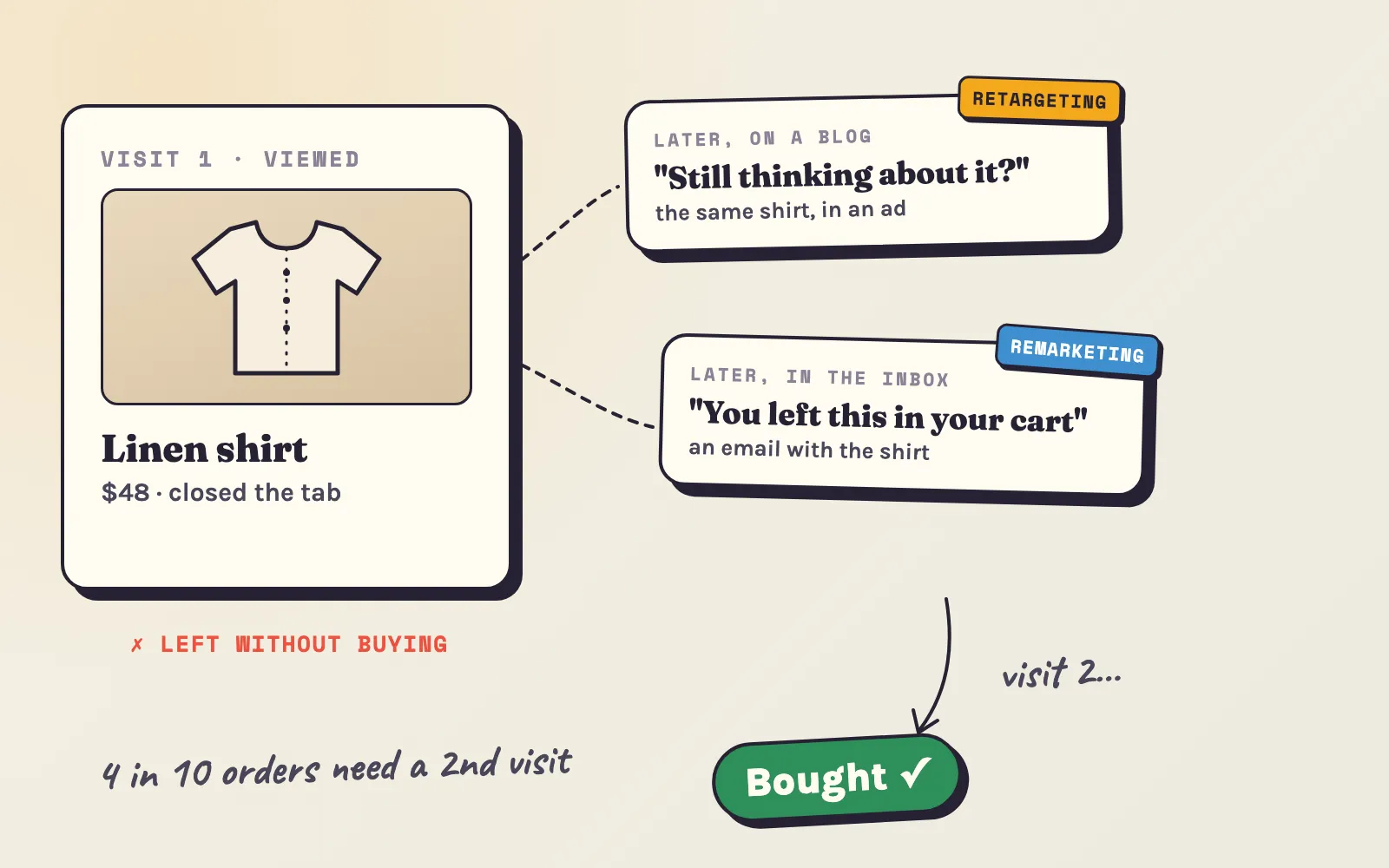
There is a second number that matters just as much: most buyers do not buy on the first visit. In a sample of 112 Shopify stores - apparel, home & garden, car parts, food, pet supplies, health & beauty and electronics among them - 43% of orders came after two or more visits (median store, about 59,000 orders, January-September 2026). A visitor who leaves today is not lost, if something brings them back. We come back to that in step 4.
Step 1: make the store ready (one afternoon)
Traffic to a store that loses visitors is wasted - free or paid. Check these before you bring anyone:
- Is the store open?A new Shopify store stays behind a password page until you choose a plan. Open your domain in a private window to check.
- Does a test order work?Buy your cheapest product on your own phone, with a real card or Shopify's test mode. Cancel and refund it afterwards.
- Are the shipping costs visible?On the product page, next to the price. Surprise costs at checkout are the top reason shoppers leave.
- Does it look like a real business?An About page with your story, a contact email, a returns policy, your country.
- Are there reviews?Even three honest reviews from people who tried the product beat none. Never fake them.
- Is it fast on a phone?About 3 in 4 visits come from phones. The buy button should be visible without scrolling.
- Are your products on Google?Install Shopify's free Google & YouTube app and sync your products - it takes 20 minutes and works for you from then on.
Get your first reviews from your first circle. Send the product - or a discount code for it - to five to ten friends, family members or local people who would really use it. Ask for one thing: an honest review with a photo. Not a pity purchase; a pity purchase does not tell you anything and does not help the next shopper. Real reviews do: a product with five reviews is far more likely to sell than one with none (Spiegel Research Center).
Step 2: the free methods (they cost time)
Free traffic is real, but it is slow, and you pay for it with hours. The rule that makes it work: pick two or three channels and do them every day for a month, instead of trying all of them once. Here is what each one takes and what to expect.
Post a short video of your product every day
TikTok, Instagram Reels and YouTube Shorts show new accounts to people who do not follow them. That makes short video the only free channel where a store with zero followers can reach thousands of strangers next week.
How to do it:
- Film one video a day, 10-30 seconds, on your phone. Natural light, the product in real hands. No studio needed - polished videos often do worse than honest ones.
- Post the same video on all three apps. TikTok, Reels and Shorts reward the same kind of clip. One video, three chances.
- Win the first two seconds. Start with the result or the problem, not with your logo: “This is why my plants stopped dying”, “The bag that survived a year of daily commuting”.
- Rotate a few formats: the problem and how the product solves it; unboxing; before and after; how it is made or packed; three things people don’t know about it; answering a real comment; a customer’s photo or review.
- Put the store link in your bio, and say once per video where to find the product.
- After 30 videos, look at the numbers. Which three videos got the most views and profile visits? Make more like them - and keep them for your first ads (see step 3).
What to expect: brand accounts with 1,000-5,000 followers averaged about 350 views per TikTok in 2025 (Socialinsider, 40.7 million videos). Thirty videos at 350 views is about 10,500 views. If 1 in 100 viewers visits the store, that is about 100 visitors - roughly one order. One video that takes off can bring more than a month of average ones, but you cannot plan on it. Plan on the routine.
Start a YouTube channel for longer videos
Short videos are found by luck; longer YouTube videos are found by search. People type “best hiking backpack under $100” or “how to clean a cast iron pan” into YouTube, and a good answer is watched for years.
How to do it:
- Answer the questions your buyers ask before they buy. “How to choose…”, “X vs Y”, “Is X worth it?”, “How to use / set up / care for X”. Your product is part of the answer, not the whole video.
- Show, don’t sell. A 5-10 minute video that really helps builds more trust than any ad. Put the product link in the first line of the description.
- Make the title the search. “How to choose a dog harness (3 mistakes to avoid)” beats “Our new harness collection”.
- One video a week is enough. Turn each long video into three or four Shorts - you already post them every day.
What to expect: the first months are slow. YouTube needs time to learn who your videos are for. But this is the free channel where work keeps paying the longest, and the viewers who arrive from a 7-minute video already trust you.
Pin your products on Pinterest
Pinterest is a search engine for ideas, and its users come to plan purchases - according to Pinterest, 96% of searches there do not include a brand name. For a new store without a known name, that matters: shoppers search for “boho living room ideas”, not for you.
How to do it:
- Make a free business account and claim your website.
- Install the Pinterest app for Shopify. It turns your products into product pins with price and stock, and keeps them up to date.
- Create 3-5 fresh pins a day - new images or new text for the same products: the product in a room, in an outfit, in a gift guide, in a “how to style” collage. Vertical images (2:3) work best.
- Write titles and descriptions with the words people search for - “small balcony garden ideas”, not “Product #12”.
- Group pins into boards by idea, not by your collections: “Gifts for coffee lovers”, “Minimal desk setup”.
What to expect: almost nothing for a few weeks, then a slow climb. Pins keep bringing visitors for months after you post them, so this is a channel for stores that sell something visual - home, fashion, jewelry, gifts, food, crafts.
Make your store easy to find on Google
Google is part of many orders: in a sample of 112 Shopify stores, a Google visit - ad or free result - was part of 36% of orders in the median store. Two free ways to be there:
1. Free product listings. With Shopify’s Google & YouTube app, approved products can appear for free in the Shopping tab, in Search, Images and YouTube (Shopify). Give each product a title with the words a shopper would type - “Linen shirt, short sleeve, sand, men’s” - a clear photo on a plain background and the right category. This takes an afternoon and then works by itself.
2. Pages and articles that answer buyer questions. Write the page a buyer is looking for just before they buy:
- Collection pages named the way people search: “Waterproof hiking boots for women” instead of “Collection 3”, with a short paragraph on top that helps choose.
- Product descriptions you wrote yourself, with real details: sizes, materials, who it is for, what it is not good for. Copied supplier text is on hundreds of other stores.
- A few honest guides on your blog: “How to choose a…”, “X vs Y: which one do you need?”, “5 mistakes when buying…”. Link from each guide to the products it mentions.
What to expect: this is the slowest channel. Only 1.74% of new pages reached Google’s top 10 within a year (Ahrefs, 1 million pages), and niche questions with few competitors rank much faster than broad ones. Write for the long-tail questions. Expect three to six months - and then traffic that does not stop when you stop working.
Build an Instagram around an angle
An Instagram account with only product photos is a catalogue nobody follows. People follow a reason: a person, a story, a point of view. Find your angle before you post:
| Angle | What you post | Fits stores that sell… |
|---|---|---|
| The maker | How it is made, materials, mistakes, the workshop | Handmade, small-batch, food, cosmetics |
| The founder’s story | Why you started, the problem you had, the journey so far | Almost anything - people buy from people |
| The expert | Tips, how-tos, myths in your niche, with the product inside | Tools, hobby gear, pet, fitness, gardening |
| The community | Customers’ photos, their stories, questions answered | Fashion, outdoor, pet, parenting |
| The taste | A clear style - colours, rooms, outfits you curate | Home decor, fashion, jewelry |
How to do it: post 3-5 times a week (your daily short videos count as Reels), add stories on most days, and answer every comment and message - in the first months, every conversation is a possible customer. Work with neighbouring accounts: a joint post or giveaway with a store that sells something that fits next to yours reaches buyers you could not reach alone.
What to expect: Instagram builds trust more than it builds traffic - a shopper from an ad who finds a real account with real people is more likely to buy. On its own it is rarely the source of the very first sale.
Help in communities, and send your product to small creators
- Communities. Subreddits, Facebook groups and forums about your niche. Answer questions for a week before you mention the store, and when you do, say that it is yours. Hidden promotion gets removed - and can get your account banned.
- Micro-creators. Find three to five creators with 2,000-20,000 followers whose audience matches your buyer. Send the product as a gift, ask for an honest post, and give each one a tagged link from the UTM builder so you see who brings buyers. It costs a few products and a few hours.
- Adeagle’s free plan. An ad exchange with other Shopify stores: your store shows partner stores’ products in an ad block, and your products appear in theirs. It costs nothing but a place on your page.
The honest part about free methods
Free methods work - but on the timeline of months. Most stores that rely on them alone get the first orders in month two or three, not in week one. If you have more time than money, that is a fine trade. Use the time to learn which product and which message people react to. That knowledge is exactly what makes your first paid budget work.
If you can’t wait that long, the next step is paying for some of the visitors.
Step 3: the paid methods (they cost money, save time)
Paid traffic compresses months into weeks. You decide how many visitors you get, and you get them this week. The cost depends on the channel:
- Orders a month
- 2.5Facebook and Instagram, at your rate
- At least one order
- 92%chance, in the first month
- On Adeagle
- 134,258-196,224views a month · Professional
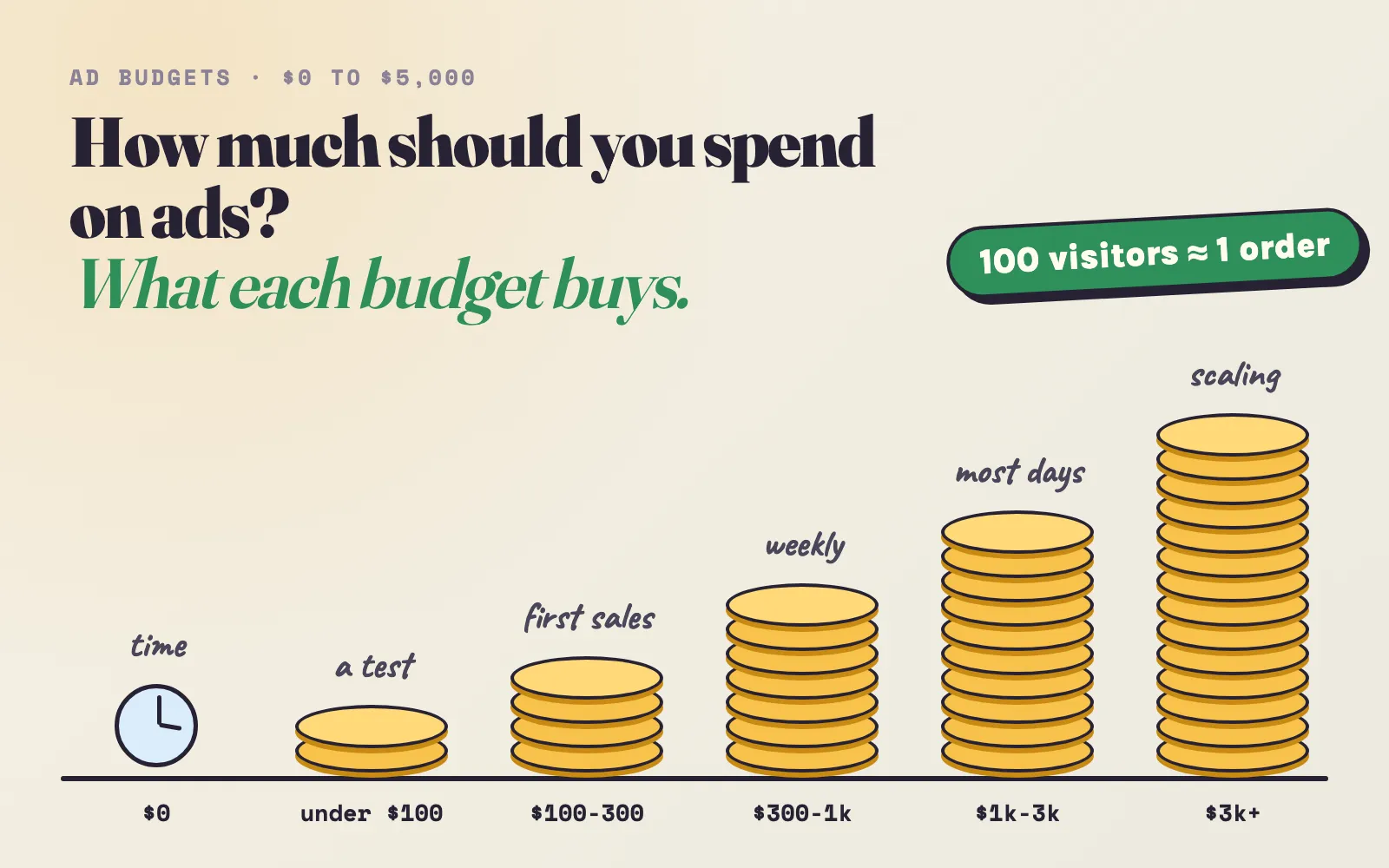
First sales. $6.58 a day buys about 253 visitors a month on Facebook and Instagram. Put it on one or two channels, and bring back the visitors who did not buy.
For most new stores, $100-300 a month on one or two channels is the stage where the first sales come. Below $100 you mostly learn whether people click. Pick a budget you can keep for at least four weeks without needing the money back - a budget stopped after ten days loses the orders it already paid for, because many visitors buy on a later visit.
Facebook and Instagram ads: the fastest way to a first sale
For most products, Meta’s ads are the most effective way to a first sale. They do not need people to search for you: the system finds people who are likely to want the product, even if they never heard of it. And they are where many sales start - in a sample of 28 Shopify stores, Facebook or Instagram was the first visit in 9 of 10 orders it was part of.
The catch: on Meta today, the creative is the targeting. The system decides who sees your ad mostly from what is in the ad. A weak creative to a perfect audience loses to a strong creative to a broad one. So plan for testing - the first set of ads rarely contains the winner.
How to set it up:
- Connect tracking first. Install Shopify’s Facebook & Instagram app and turn on data sharing at the highest level. It sets up the pixel and the server-side connection, so Meta sees your orders.
- One campaign with the Sales objective, one ad set, a broad audience. Country, age range if your product needs it - and let the system find the buyers. Narrow interests rarely help a new account.
- Three to five ads that differ in their idea, not only in colour or a word. For example: the problem and the solution; an unboxing; a customer’s review; the product next to the expensive alternative; a “3 reasons” list. Your best organic videos from step 2 are ideal - they already proved that people watch them.
- A budget you can keep: $10-15 a day buys roughly 380-570 visitors a month at about $0.79 each. That is enough for the first orders, not for Meta’s “learning” status - Meta’s system learns fully from about 50 purchases a week (Meta), which a new store will not reach. Ignore the label; judge the numbers.
How to judge it - in this order:
| After | Look at | Good sign | If not |
|---|---|---|---|
| 3-4 days | Link click-through rate per ad | Around 1% or more | Replace the weakest ads with new ideas |
| 1 week | Cost per visitor | Below what one visitor may cost you* | A new creative, or a cheaper channel |
| 2 weeks | Add to carts | A few for every 100 visitors | Fix the product page, not the ad |
| 3-4 weeks | Orders | The first orders, ideally from more than one ad | Keep the best ad, test a new set against it |
*The most one visitor may cost = profit per order × conversion rate. With $25 profit per order at 1%, that is $0.25. The CPC calculator does it for you.
Expect a few rounds. Most stores need two or three sets of creatives before one ad clearly works. Each week, turn off the weakest ads and add two or three new ideas. Keep a running list of what you tried - the hook, the format, the result. That list is worth more than any targeting setting.
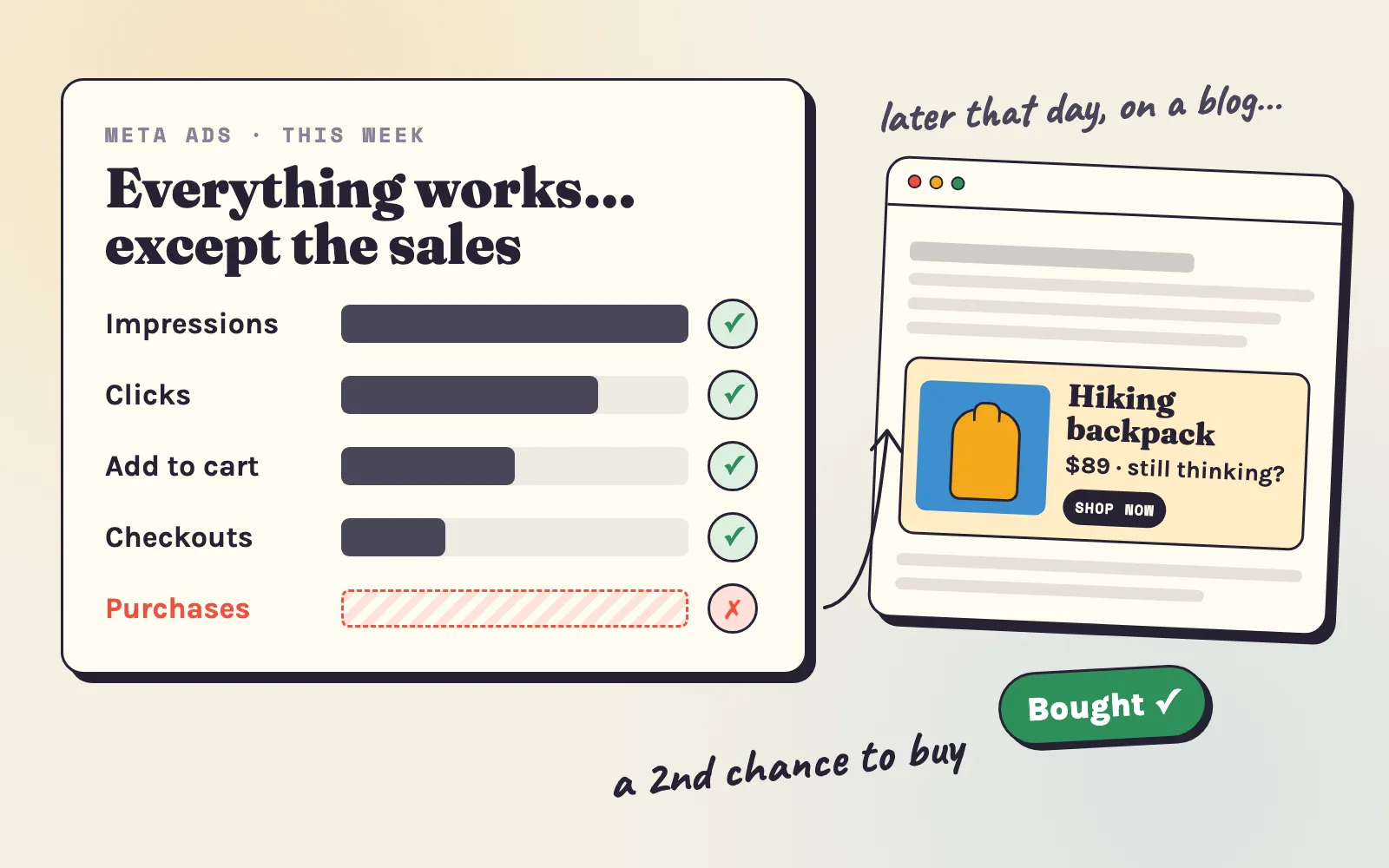
Most Meta buyers come back before they buy. In the same 28 stores, 6 in 10 orders that included a Facebook or Instagram visit took two or more visits. Meta brings the shopper in; something else often brings them back. That is why retargeting belongs next to your Meta ads from the first week (step 4). If your ads get clicks but no orders, our guide to Meta ads not converting goes through the checks.
Google ads: for people who already search
Google is the opposite of Meta. It does not create demand; it catches it. When someone types “replacement filter for X” or “linen bed sheets queen”, they want to buy now. If people already search for your kind of product, Google can bring the first sale with a small budget.
How to set it up:
- Start from the product feed you already connected in step 1 (Google & YouTube app). A clean feed is the foundation of every Google shopping ad: clear titles, correct prices, good images, the right category.
- Shopping ads for your 3-10 best products. They show the photo and the price right in the results, so the click comes from someone who already saw both.
- Search ads only for exact product terms - the name of the product type plus a detail (“waterproof dog coat large”), not broad words (“dog”). Broad words spend the budget on people who are only looking.
- $10-20 a day is enough to learn which products and searches bring buyers.
Good fit: spare parts, accessories for a known product, problem solvers people search for, known product types at a fair price. Weak fit: a new kind of product nobody knows to search for yet - that is Meta’s job.
Adeagle: discovery where people shop, and the second chance
Meta and Google are where most stores start. Adeagle works next to them and adds two things they do not give a new store - and it is much simpler to run.
1. Discovery in places where people already shop. Adeagle shows your products as ads in other Shopify stores, in shopping apps and on niche websites that match what you sell - you choose the product categories and shopper interests, and your ads appear on pages about those topics: a kitchenware store on cooking sites, a pet store next to pet content. These are different places from social feeds. In September-October 2026, 80% of Adeagle’s banner views were in apps and 74% of clicks came from phones (our benchmarks) - shoppers who scroll and browse outside Facebook and Instagram, and who may never see your social ads.
2. The second chance for every channel. Retargeting shows your visitors the products they looked at, later, on other sites and apps they visit - no matter if they first came from Meta, Google, TikTok or a Pinterest pin. In our data, retargeting ads were clicked 6 to 12 times more often than ads to new shoppers. Your Meta and Google budget brings the first visit; retargeting turns more of those visits into the second visit that ends in an order. Retargeting is part of the Professional and Ultimate plans.
3. It runs without an ads manager. Compare the setup:
A first Meta campaign
- A business account, a page, an ad account and a payment method.
- Tracking - the app, data sharing, events to check.
- Creatives - three to five videos or images, each with its own text.
- Campaign settings - objective, audience, placements, budget type.
- Weeks of testing to find the creative that works.
A first Adeagle campaign
- Install the app from the Shopify App Store.
- Your products are already there - the app reads your product feed by itself.
- The ads build themselves from your product photos, titles and prices.
- Pick products, categories and a budget - about a minute.
- The learning runs by itself - which websites, apps and formats work for your products.
Two tips for your first Adeagle campaign:
- Give the campaign several products, not one. In September-October 2026, banners that showed several products got 0.42-0.44% click-through, against 0.34-0.35% for banners with a single product. A choice gets more clicks than one item.
- Start with your best-sellers or your most photogenic collection, then add a second campaign with other products or other interests in week one, so the two can be compared. Our guide to your first weeks with Adeagle has the week-by-week steps.
What to expect: first visitors in the first days, first orders usually in weeks two to five. In our data, the median store got its first order from Adeagle ads after 19 days, and 13 of 18 stores within four weeks. A home & garden store on the free plan got its first order from the ads on day 12 - on the shopper’s third visit. A US food store on a $99 budget got its first on day 22, after about 450 ad visitors, from a retargeting ad. More examples are in the case studies of the budget guide.
Which paid channel first?
| Your situation | Start with | Then add |
|---|---|---|
| A new or visual product people don’t search for yet | Facebook and Instagram ads | Retargeting |
| People already search for your product type | Google Shopping ads | Retargeting, then Meta |
| A small budget and no time for creatives | Adeagle (discovery + retargeting) | Meta, once you have videos that work |
| Already running Meta or Google without sales | Retargeting for the visitors they bring | A second set of creatives |
Step 4: bring the visitors back
Every method above brings first visits. The first sale often happens on the second or third. So from day one, give every visitor a way back:
- Collect the email on the first visit. A small pop-up with a first-order discount - “10% off your first order” - is enough. Shopify Email sends 10,000 emails a month for free (Shopify help).
- Switch on the abandoned checkout email. It is free in Shopify, under Marketing > Automations. It reaches the shoppers who got furthest - their address is already typed.
- Retarget the visitors who left no email - which is most of them. Retargeting shows them the products they viewed, later, in other places. On Adeagle, retargeting ads brought about 100 times more sales per 1,000 views than ads to new shoppers.
A 30-day plan to your first sale
Pick the column that fits your budget. The free column is worth doing in both cases - it feeds your ads with videos and your store with trust.
| Week | Free - every day | With a budget |
|---|---|---|
| 1 | The seven checks of step 1. Send the product to your first circle for reviews. Install the Google & YouTube app. Start one short video a day on all three apps. | The same - fix the store before you pay for visitors. Install Adeagle, create the first campaign and switch on the free ad exchange or a plan. |
| 2 | Keep the daily video. Set up Pinterest with the Shopify app, 3-5 pins a day. Rename products and collections the way people search. Email pop-up and abandoned checkout email on. | Meta: one sales campaign, 3-5 creatives, your best videos. Or Google Shopping on your best products, if people search for them. |
| 3 | Write your first buyer guide. Answer questions in two communities. Send products to three micro-creators. | Replace the weakest ads with new ideas. Add retargeting for the visitors who did not buy. |
| 4 | Look at your 30 videos: make more of the top three. Ask the first buyers for a review. | Judge on add to carts and orders, not only clicks. Keep the winners, test a new set, keep the budget running. |
If week 4 ends with about 300 real visitors and still no order, the traffic has done its job and the store has not - go through the five causes of no sales to find the step that breaks.
After the first sale
The first order is proof that a stranger trusts your store with their money. Use it:
- Find where it came from. In Shopify, open the order and look at the customer journey (conversion summary): the first and the last visit, and how many in between. Do more of what brought it.
- Make the first customer happy. Ship fast, add a handwritten note, send a short thank-you email. Ask for a review with a photo two weeks after delivery.
- Keep the budget running. The visitors of weeks one to three are still coming back. Stopping now loses the orders you already paid for.
- Count the second order. A customer who buys again is where small stores make their profit - the customer lifetime value calculator shows what one is worth to you.
Free tools for the plan
- Ad budget calculator - the budget a goal of orders needs.
- CPC calculator - how many visitors a budget buys, and the most you can pay for one.
- Conversion rate calculator - your rate next to other Shopify stores, and the step that leaks.
- UTM builder - tagged links for videos, pins, creators and emails, so you see which one brought the sale.
- ROAS calculator - the return your ads need to make money.
The first sale is not luck and not a secret trick. It is about 100 real visitors, a store that does not lose them, and a second chance for the ones who were not ready. Do the free work every day, pay for speed when you can, and bring every visitor back.
Want your products in front of shoppers in other stores, shopping apps and niche websites - and your visitors brought back? Add Adeagle from the Shopify App Store, follow the getting started guide, and compare the plans on the pricing page.
Sources: Shopify conversion rates - Littledata (438 stores, August-October 2026); TikTok reach - Socialinsider (40.7 million videos, 2025); Pinterest unbranded searches - Pinterest, as reported by eMarketer; time to rank on Google - Ahrefs (1 million pages); free Google listings - Shopify; Meta’s learning phase - Meta Business Help Center; Shopify Email - Shopify help; reviews - Spiegel Research Center, “How Online Reviews Influence Sales”; channel costs - the 2025-2026 benchmarks listed in our ad budget guide. Adeagle data: our own ad serving (August-October 2026) and, for orders and visits, Shopify’s record of each order in samples of stores using Adeagle (2026).
Questions
Make sure the store is open and a test order works, then bring about 100 to 300 real visitors and give them a reason to come back. With no budget, post a short product video every day, pin your products on Pinterest, list them for free on Google and ask your own network for honest first reviews. With a budget, run Facebook and Instagram ads with three to five different creatives, add Google Shopping for people who already search, and use retargeting to bring visitors back.
With ads, usually two to five weeks - in our data the median store got its first order from Adeagle ads after 19 days, and 13 of 18 stores within four weeks. With free methods only, one to three months is normal, because free channels need time before they bring steady visitors.
About 100 real (human) sessions on average at a 1% conversion rate, which is typical for a new store with cold traffic. At 300 sessions a first order is about 95% likely. A new store without reviews can convert at 0.5%, so up to about 500 sessions without a sale can still be bad luck rather than a broken store.
Yes. The fastest free ways are your own network, short videos posted every day on TikTok, Instagram Reels and YouTube Shorts, free Google listings through Shopify's Google & YouTube app, Pinterest product pins and helpful answers in the communities where your buyers talk. They cost time instead of money, and most need a few weeks to a few months.
Paid social ads on Facebook and Instagram, with three to five ads that each try a different idea, plus retargeting for the visitors who did not buy. Expect to replace the weak ads once or twice before one works. The fastest free way is your own network - friends, family and local groups who try the product and leave an honest review.
It is normal if the store had fewer than about 300 real visitors that month - check the human sessions in Shopify Analytics. If it had more, something in the store or the offer needs fixing; our guide to no sales on Shopify finds which step.
Facebook and Instagram ads if your product is new, visual or solves a problem people do not search for yet - the ads find buyers who did not know they wanted it. Google ads if people already search for your product by name, such as spare parts or a known type of product. Many stores start on one and add retargeting, which brings back the visitors of both.
Ask them to try the product and leave an honest review, not to buy out of pity. Real reviews on your product page help every stranger who comes later, and a friend who really likes the product often tells someone who buys.